
Thank you for agreeing to present at Access Mob’s upcoming Community Lecture Night!
A reminder that we strive to make these events accessible to people with a wide range of disabilities, including people who are blind or low-vision. Therefore it is important to include an audio description (AD, aka image description, visual description, or alt text) of any visual elements of your presentation, including all text, and consider that as you design and practice your presentation.
Here’s how you should describe yourself:
- Do this before saying anything else!
- Include a brief description of characteristics that are relevant to how you might be visually identified.
- What color hair do you have?
- How does your ethnicity appear? (If you are white, actually say you are white, don’t make others assume.)
- Are you wearing glasses?
- What does your shirt look like?
- What is behind you on screen?
- Is your age apparent, and if so, how? (gray hair, youthful acne, etc)
- What is your general expression?
- Do you have any interesting features? (visible tattoos, piercings, facial differences)
- What is your gender presentation?
- Are you small or large? (Fat is not a bad word in this context – this is information that may be missing to people who cannot see you.)
- When you are done, continue with what you were going to say, or introduce the next person, or vocally point the focus back at the host.
For example, this is how Alisa Grishman often introduces herself: “I’m Alisa Grishman of Access Mob Pittsburgh. I’m a fat, white woman with curly brown hair. I’m wearing a blue shirt with a logo similar to Superman, except it’s a wheelchair instead of an S. I am sitting in a wheelchair. My pronouns are she/her.”
Additionally, make sure you have read everything on your slide as you present. Avoid saying things like “as you can see on the slide,” and explain any graphs or charts that appear completely. In order to be fully descriptive during your presentation, you will need to verbally include names, text, graphics, charts, or graphs, as well as any additional relevant visual information. A description can also include places, objects, or use specific language to describe actions occurring on screen. See below for an example.
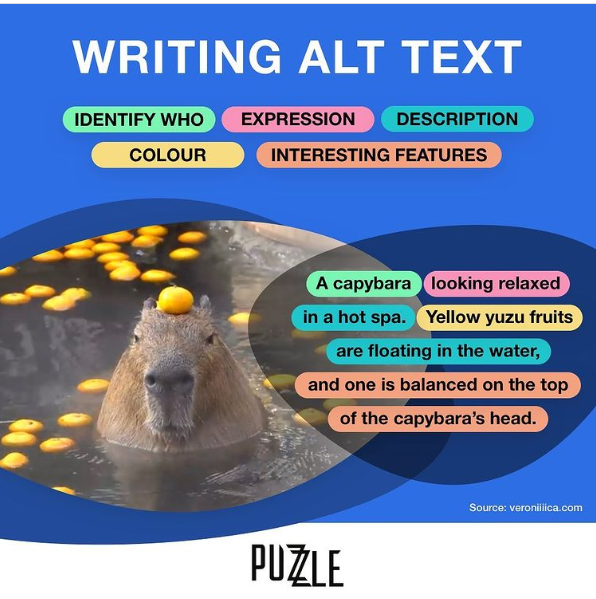
Image description: An infographic titled “How To Write Alt Text” featuring a photo of a capybara on a blue background. Parts of commonly requested alt text are listed and divided by color, reading ‘identify who, expression, description, colour, and interesting features’. The description reads ‘A capybara looking relaxed in a hot spa. Yellow yuzu fruits are floating in the water, and one is balanced on the top of the capybara’s head’, with segments of the phrase in corresponding colors to the types of information listed above. In the bottom right corner, text reads Source: veroniiiica dot com with 4 i’s, and a logo is present at the bottom center that reads ‘puzzle’ with overlapping z’s”
https://www.perkins.org/resource/how-write-alt-text-and-image-descriptions-visually-impaired/ has this image and lots more info.
Here are some documents with tips for Audio Descriptions in Presentations:
https://mn.gov/mnit/media/blog/?id=38-666047
https://veroniiiica.com/how-to-create-accessible-powerpoints/ (Veronica With Four Eyes has a lot of great resources on other elements of providing accessibility for people who are blind or low vision.)
If there are multiple speakers, when switching speakers, identify who is speaking first, such as “John here, the purpose…”
And a reminder to please keep your speaking pace to a moderate speed so that our interpreter, and our audience, can keep up. Do not speak fast; you may need to practice this.
If you have any questions, please don’t hesitate to ask us!
Thank you,
Access Mob Pittsburgh

